Create a VM in Azure
This is a guide to create a VM in Azure using Azure Resource Manager template

we will be creating a VM in that azure account to install all the requirements. We will run a single VM in azure named devsecops-cloud installed ubuntu. This VM will have 4 CPU quads and 16GB memory. There will be a firewall rule to allow any ingress (accept all incoming traffic).
VM Creation → Go the marketplace and search for custom templates and upload this file.
{
    "$schema": "http://schema.management.azure.com/schemas/2015-01-01/deploymentTemplate.json#",
    "contentVersion": "1.0.0.0",
    "parameters": {
        "location": {
            "type": "string"
        },
        "networkInterfaceName": {
            "type": "string"
        },
        "enableAcceleratedNetworking": {
            "type": "bool"
        },
        "networkSecurityGroupName": {
            "type": "string"
        },
        "networkSecurityGroupRules": {
            "type": "array"
        },
        "subnetName": {
            "type": "string"
        },
        "virtualNetworkName": {
            "type": "string"
        },
        "addressPrefixes": {
            "type": "array"
        },
        "subnets": {
            "type": "array"
        },
        "publicIpAddressName": {
            "type": "string"
        },
        "publicIpAddressType": {
            "type": "string"
        },
        "publicIpAddressSku": {
            "type": "string"
        },
        "virtualMachineName": {
            "type": "string"
        },
        "virtualMachineComputerName": {
            "type": "string"
        },
        "virtualMachineRG": {
            "type": "string"
        },
        "osDiskType": {
            "type": "string"
        },
        "dataDisks": {
            "type": "array"
        },
        "dataDiskResources": {
            "type": "array"
        },
        "virtualMachineSize": {
            "type": "string"
        },
        "adminUsername": {
            "type": "string"
        },
        "adminPassword": {
            "type": "secureString"
        }
    },
    "variables": {
        "nsgId": "[resourceId(resourceGroup().name, 'Microsoft.Network/networkSecurityGroups', parameters('networkSecurityGroupName'))]",
        "vnetId": "[resourceId(resourceGroup().name,'Microsoft.Network/virtualNetworks', parameters('virtualNetworkName'))]",
        "subnetRef": "[concat(variables('vnetId'), '/subnets/', parameters('subnetName'))]"
    },
    "resources": [
        {
            "name": "[parameters('networkInterfaceName')]",
            "type": "Microsoft.Network/networkInterfaces",
            "apiVersion": "2018-10-01",
            "location": "[parameters('location')]",
            "dependsOn": [
                "[concat('Microsoft.Network/networkSecurityGroups/', parameters('networkSecurityGroupName'))]",
                "[concat('Microsoft.Network/virtualNetworks/', parameters('virtualNetworkName'))]",
                "[concat('Microsoft.Network/publicIpAddresses/', parameters('publicIpAddressName'))]"
            ],
            "properties": {
                "ipConfigurations": [
                    {
                        "name": "ipconfig1",
                        "properties": {
                            "subnet": {
                                "id": "[variables('subnetRef')]"
                            },
                            "privateIPAllocationMethod": "Dynamic",
                            "publicIpAddress": {
                                "id": "[resourceId(resourceGroup().name, 'Microsoft.Network/publicIpAddresses', parameters('publicIpAddressName'))]"
                            }
                        }
                    }
                ],
                "enableAcceleratedNetworking": "[parameters('enableAcceleratedNetworking')]",
                "networkSecurityGroup": {
                    "id": "[variables('nsgId')]"
                }
            }
        },
        {
            "name": "[parameters('networkSecurityGroupName')]",
            "type": "Microsoft.Network/networkSecurityGroups",
            "apiVersion": "2019-02-01",
            "location": "[parameters('location')]",
            "properties": {
                "securityRules": "[parameters('networkSecurityGroupRules')]"
            }
        },
        {
            "name": "[parameters('virtualNetworkName')]",
            "type": "Microsoft.Network/virtualNetworks",
            "apiVersion": "2019-09-01",
            "location": "[parameters('location')]",
            "properties": {
                "addressSpace": {
                    "addressPrefixes": "[parameters('addressPrefixes')]"
                },
                "subnets": "[parameters('subnets')]"
            }
        },
        {
            "name": "[parameters('publicIpAddressName')]",
            "type": "Microsoft.Network/publicIpAddresses",
            "apiVersion": "2019-02-01",
            "location": "[parameters('location')]",
            "properties": {
                "publicIpAllocationMethod": "[parameters('publicIpAddressType')]"
            },
            "sku": {
                "name": "[parameters('publicIpAddressSku')]"
            }
        },
        {
            "name": "[parameters('dataDiskResources')[copyIndex()].name]",
            "type": "Microsoft.Compute/disks",
            "apiVersion": "2020-09-30",
            "location": "[parameters('location')]",
            "properties": "[parameters('dataDiskResources')[copyIndex()].properties]",
            "sku": {
                "name": "[parameters('dataDiskResources')[copyIndex()].sku]"
            },
            "copy": {
                "name": "managedDiskResources",
                "count": "[length(parameters('dataDiskResources'))]"
            }
        },
        {
            "name": "[parameters('virtualMachineName')]",
            "type": "Microsoft.Compute/virtualMachines",
            "apiVersion": "2021-03-01",
            "location": "[parameters('location')]",
            "dependsOn": [
                "managedDiskResources",
                "[concat('Microsoft.Network/networkInterfaces/', parameters('networkInterfaceName'))]"
            ],
            "properties": {
                "hardwareProfile": {
                    "vmSize": "[parameters('virtualMachineSize')]"
                },
                "storageProfile": {
                    "osDisk": {
                        "createOption": "fromImage",
                        "managedDisk": {
                            "storageAccountType": "[parameters('osDiskType')]"
                        }
                    },
                    "imageReference": {
                        "publisher": "Canonical",
                        "offer": "0001-com-ubuntu-server-jammy",
                        "sku": "22_04-lts-gen2",
                        "version": "latest"
                    },
                    "copy": [
                        {
                            "name": "dataDisks",
                            "count": "[length(parameters('dataDisks'))]",
                            "input": {
                                "lun": "[parameters('dataDisks')[copyIndex('dataDisks')].lun]",
                                "createOption": "[parameters('dataDisks')[copyIndex('dataDisks')].createOption]",
                                "caching": "[parameters('dataDisks')[copyIndex('dataDisks')].caching]",
                                "diskSizeGB": "[parameters('dataDisks')[copyIndex('dataDisks')].diskSizeGB]",
                                "managedDisk": {
                                    "id": "[coalesce(parameters('dataDisks')[copyIndex('dataDisks')].id, if(equals(parameters('dataDisks')[copyIndex('dataDisks')].name, json('null')), json('null'), resourceId('Microsoft.Compute/disks', parameters('dataDisks')[copyIndex('dataDisks')].name)))]",
                                    "storageAccountType": "[parameters('dataDisks')[copyIndex('dataDisks')].storageAccountType]"
                                },
                                "writeAcceleratorEnabled": "[parameters('dataDisks')[copyIndex('dataDisks')].writeAcceleratorEnabled]"
                            }
                        }
                    ]
                },
                "networkProfile": {
                    "networkInterfaces": [
                        {
                            "id": "[resourceId('Microsoft.Network/networkInterfaces', parameters('networkInterfaceName'))]"
                        }
                    ]
                },
                "osProfile": {
                    "computerName": "[parameters('virtualMachineComputerName')]",
                    "adminUsername": "[parameters('adminUsername')]",
                    "adminPassword": "[parameters('adminPassword')]",
                    "linuxConfiguration": {
                        "patchSettings": {
                            "patchMode": "ImageDefault"
                        }
                    }
                },
                "diagnosticsProfile": {
                    "bootDiagnostics": {
                        "enabled": true
                    }
                }
            }
        }
    ],
    "outputs": {
        "adminUsername": {
            "type": "string",
            "value": "[parameters('adminUsername')]"
        }
    }
}
After that there will be a prompt to choose a reign and VM specifications.
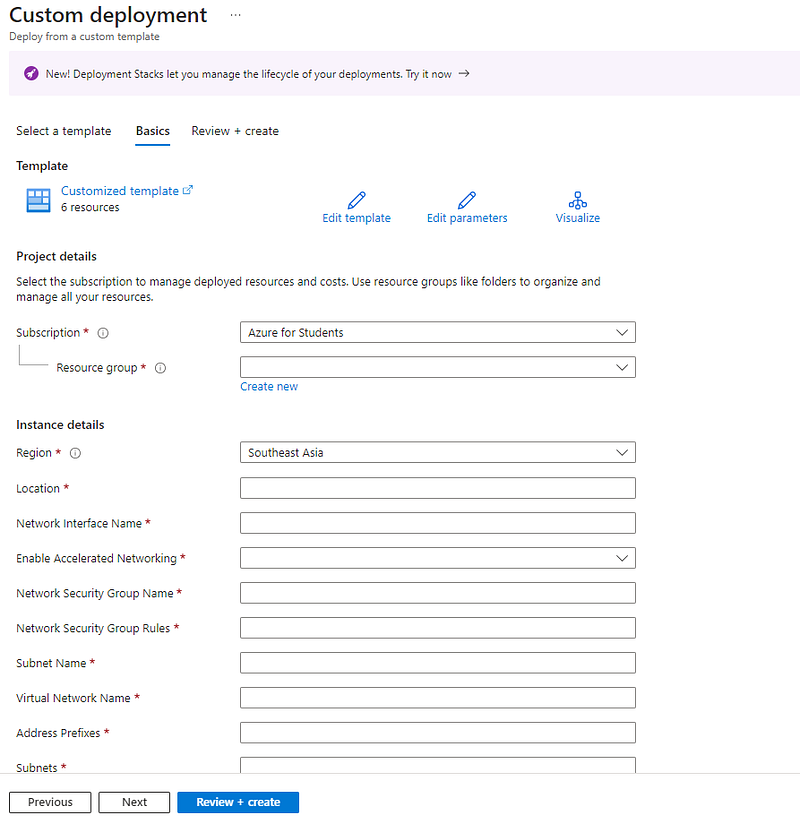
In here click on the Edit parameters section and insert this code →
{
    "$schema": "https://schema.management.azure.com/schemas/2015-01-01/deploymentParameters.json#",
    "contentVersion": "1.0.0.0",
    "parameters": {
        "location": {
            "value": "eastus"
        },
        "networkInterfaceName": {
            "value": "devsecops-cloud801"
        },
        "enableAcceleratedNetworking": {
            "value": true
        },
        "networkSecurityGroupName": {
            "value": "devsecops-cloud-nsg"
        },
        "networkSecurityGroupRules": {
            "value": [
                {
                    "name": "allow-all",
                    "properties": {
                        "priority": 100,
                        "protocol": "*",
                        "access": "Allow",
                        "direction": "Inbound",
                        "sourceApplicationSecurityGroups": [],
                        "destinationApplicationSecurityGroups": [],
                        "sourceAddressPrefix": "*",
                        "sourcePortRange": "*",
                        "destinationAddressPrefix": "*",
                        "destinationPortRange": "*"
                    }
                },
                {
                    "name": "default-allow-ssh",
                    "properties": {
                        "priority": 1000,
                        "protocol": "TCP",
                        "access": "Allow",
                        "direction": "Inbound",
                        "sourceApplicationSecurityGroups": [],
                        "destinationApplicationSecurityGroups": [],
                        "sourceAddressPrefix": "*",
                        "sourcePortRange": "*",
                        "destinationAddressPrefix": "*",
                        "destinationPortRange": "22"
                    }
                }
            ]
        },
        "subnetName": {
            "value": "default"
        },
        "virtualNetworkName": {
            "value": "devsecops-cloud_group-vnet"
        },
        "addressPrefixes": {
            "value": [
                "10.0.0.0/16"
            ]
        },
        "subnets": {
            "value": [
                {
                    "name": "default",
                    "properties": {
                        "addressPrefix": "10.0.0.0/24"
                    }
                }
            ]
        },
        "publicIpAddressName": {
            "value": "devsecops-cloud-ip"
        },
        "publicIpAddressType": {
            "value": "Static"
        },
        "publicIpAddressSku": {
            "value": "Basic"
        },
        "virtualMachineName": {
            "value": "devsecops-cloud"
        },
        "virtualMachineComputerName": {
            "value": "devsecops-cloud"
        },
        "virtualMachineRG": {
            "value": "devsecops-cloud_group"
        },
        "osDiskType": {
            "value": "StandardSSD_LRS"
        },
        "dataDisks": {
            "value": [
                {
                    "lun": 0,
                    "createOption": "attach",
                    "caching": "ReadOnly",
                    "writeAcceleratorEnabled": false,
                    "id": null,
                    "name": "devsecops-cloud_DataDisk_0",
                    "storageAccountType": null,
                    "diskSizeGB": null,
                    "diskEncryptionSet": null
                }
            ]
        },
        "dataDiskResources": {
            "value": [
                {
                    "name": "devsecops-cloud_DataDisk_0",
                    "sku": "StandardSSD_LRS",
                    "properties": {
                        "diskSizeGB": 512,
                        "creationData": {
                            "createOption": "empty"
                        }
                    }
                }
            ]
        },
        "virtualMachineSize": {
            "value": "Standard_D4s_v3"
        },
        "adminUsername": {
            "value": "devsecops"
        },
        "adminPassword": {
            "value": null
        }
    }
}
Then you should create a resource group and add it.
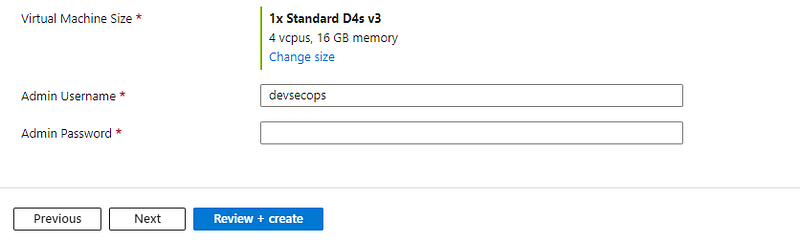
Choose this option for VM Size and choose an admin username and unique password. Then it’s good to press the next button. Then azure will check the configurations and Create button will be active.