AWS Key Pairs

In AWS EC2 services we can create key pairs and assign them to the EC2s that we create. The use of these key pairs is we can connect to the EC2 using those key pairs we created in our local machine, without using any 3rd party applications.
Instead of using password to connect to the EC2, AWS uses public key cryptography, AWS stores the public key and you get the private key. When you connect to the instance your private key proves your identity.
In linux or mac environment you can use private key directly to SSH to the instance and in a windows EC2 you can use the private key to decrypt the password of the instance.
AWS will prompt you to download the private key right away after you create it. This is the only time you can download it.
There are two types of key pairs:
- RSA — Works with almost every SSH client
- ED25519 — Fast, Secure and modern, but not supported by some legacy systems.
There are two key formats too:
- .pem — For OpenSSH
- .ppk — PuTTY on Windows
In some cases after you download the private key, you will have to set proper file permissions for the file to work.
# linux
chmod 400 mykey.pem

# windows
icacls.exe "C:\path\to\mykey.pem" /inheritance:r
icacls.exe "C:\path\to\mykey.pem" /grant:r "$($env:USERNAME):(R)"
Important:
- You cannot download a lost private key again
If you lose the private key, You will have to use EC2 instance connect (if supported) or use SSM Session manager or Detach the root volume and modify authorized_keys manually.
To manage key pairs you need these privileges:
- ec2:CreateKeyPair
- ec2:DescribeKeyPairs
- ec2:DeleteKeyPair
The process of creating key pairs is pretty straightforward and also when you creating the EC2 instance you can create a key pair. I’ll add screenshots for creating key pair using Key Pair window in AWS console.
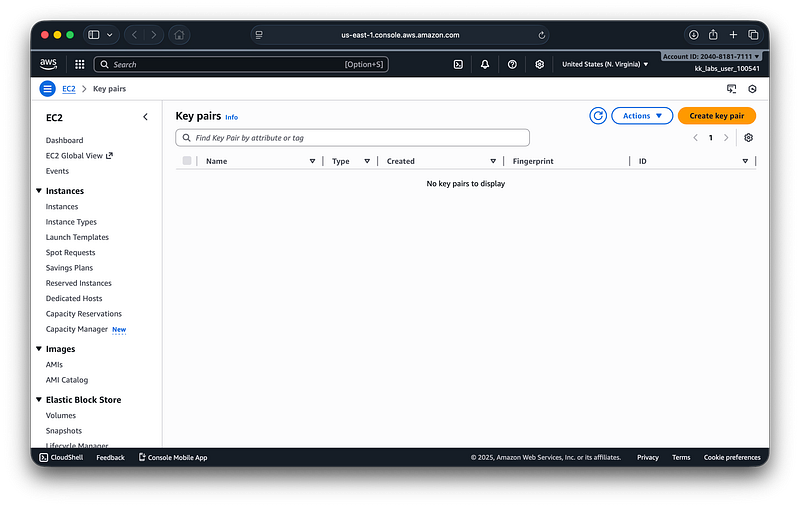
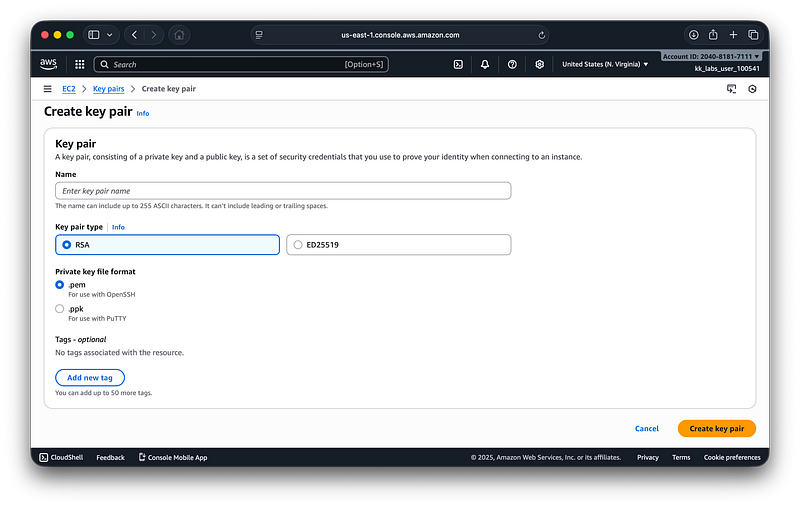
You Just have to enter the name that you want for the key pair and select which type of key pair that you want. Then create!